Posts
Dynamics 365 CRM Console Snippets for Debugging & Testing
- Get link
- X
- Other Apps
Microsoft Dynamics 365 CRM API Access Token in Postman | No Azure Required!
- Get link
- X
- Other Apps
How to Rerun Failed Workflow from Power Automate | Quick Fix in Dynamics...
- Get link
- X
- Other Apps
How to Call Out-of-the-Box Workflow from Power Automate in Dynamics 365 ...
- Get link
- X
- Other Apps
How to Convert a Managed Solution into an Unmanaged Solution?
- Get link
- X
- Other Apps
How to Add Word Templates with Dynamic Fields in Microsoft Dynamics 365 ...
- Get link
- X
- Other Apps
How Set Default home page for Microsoft dynamics 365 CRM and Power apps#...
- Get link
- X
- Other Apps
GET/SET different field values using JavaScript and generate unique name...
- Get link
- X
- Other Apps
code: function generateUniqueName(executionContext) { // Get the form context from the execution context var formContext = executionContext.getFormContext(); // Get the values of the customer, bank account, and loan type fields var customerLookup = formContext.getAttribute("abc_customer").getValue(); var bankAccountLookup = formContext.getAttribute("abc_bankaccount").getValue(); var loanType = formContext.getAttribute("abc_loantype").getText(); // Check if a customer is selected and the loan type is "Personal Loan" or "Car loan" if (customerLookup && (loanType == "Personal Loan" || loanType == "Car loan")) { // Extract relevant information from the customer lookup field var customerName = customerLookup[0].name; var customerId = customerLookup[0].id; // Gener...
How to use Business Rules to show Field on form based on value of anothe...
- Get link
- X
- Other Apps
100 Days 100 Learning Interview Questions Dynamics 365 CRM Data Types
- Get link
- X
- Other Apps
How to Show Confirm Dialog Box using JavaScript? How to display a progre...
- Get link
- X
- Other Apps
Code: function PromptDialog(executionContext) { var confirmStrings = { text: "Do you want to proceed?", title: "Confirmation", confirmButtonLabel: "Yes", cancelButtonLabel: "No" }; var confirmOptions = { height: 200, width: 400 }; Xrm.Navigation.openConfirmDialog(confirmStrings, confirmOptions).then( function (success) { if (success.confirmed == true) { CallMethod(executionContext); // Pass executionContext if needed } else { // User clicked No } } );...
How to set a field business required or mandatory using business rule ?
- Get link
- X
- Other Apps
Relationship Behavior:
- Get link
- X
- Other Apps
let's delve into relationship behavior and the available options for 1:N and N:1 relationships in Microsoft Dynamics CRM. **Relationship Behavior:** In CRM, relationship behavior defines how records in the related (child) entity behave when the associated record in the primary (parent) entity undergoes certain actions. The available relationship behaviors are: 1. **Referential:** This behavior allows a child record to be associated with a parent record, but it doesn't enforce any specific actions when the parent record is modified or deleted. It's the most basic relationship behavior. 2. **Parental:** In this behavior, the child record acts as if it's owned by the parent record. When the parent record is deleted, child records are also deleted. This is useful when you want a strict parent-child relationship, such as with activities linked to a contact. 3. **Custom:** Custom behavior provides more advanced control over what happens to child records when a parent record u...
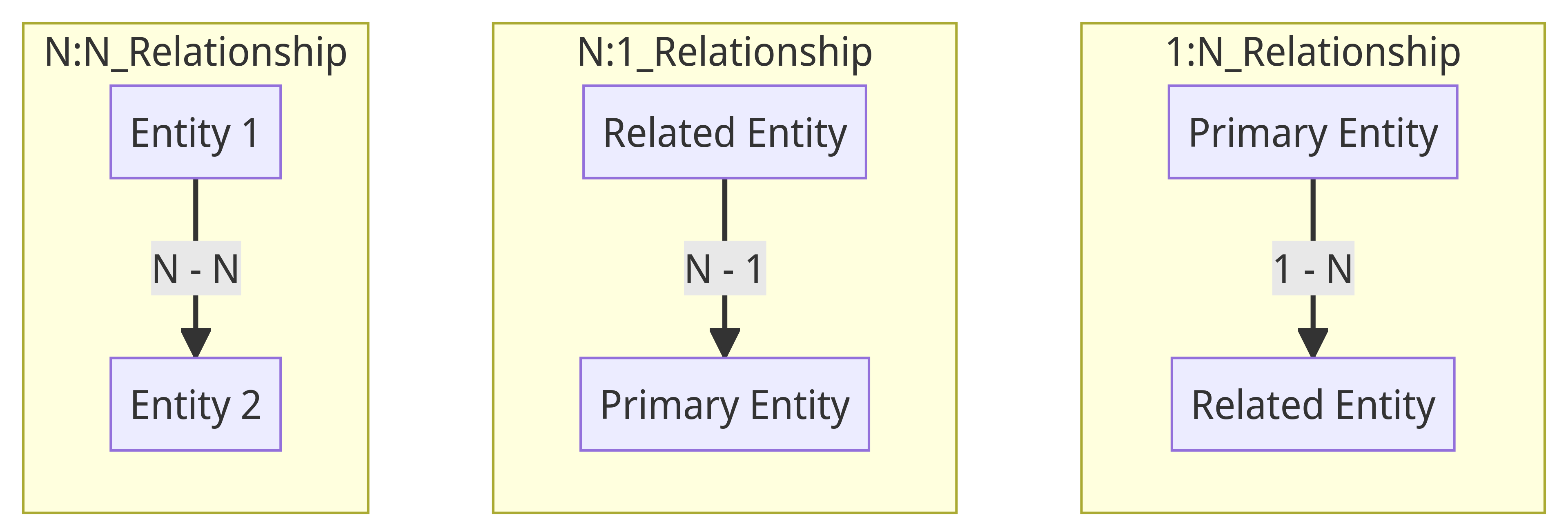
The three main types of relationships in Microsoft Dynamics CRM: 1:N (One-to-Many), N:1 (Many-to-One), and N:N (Many-to-Many) relationships.
- Get link
- X
- Other Apps
let's discuss the three main types of relationships in Microsoft Dynamics CRM: 1:N (One-to-Many), N:1 (Many-to-One), and N:N (Many-to-Many) relationships. **1:N Relationship (One-to-Many):** - **Definition:** In a 1:N or One-to-Many relationship, one record in the primary entity is associated with many related records in the related entity. It's a unidirectional relationship where records in the related entity can be linked to only one record in the primary entity. - **Example:** Think of the relationship between an "Account" (primary entity) and "Contacts" (related entity). An account can have many contacts associated with it, but each contact is linked to only one account. **N:1 Relationship (Many-to-One):** - **Definition:** In an N:1 or Many-to-One relationship, many records in the primary entity can be linked to a single related record in the related entity. It's the reverse of the 1:N relationship, where multiple records point to a common related r...
Escalation Workflow in CRM
- Get link
- X
- Other Apps
## Enhancing Customer Support: Escalation Workflow in CRM code: https://github.com/msCrmDeveloper233/Customer-Support-Escalation-Workflow/blob/72e1c43deabaa7c379a6410dc3c7a694939d047f/EscalationWorkflow.cs Continuing my CRM automation journey, I'm excited to share my latest accomplishment: a custom escalation workflow for customer support cases. Dive into my progress below: ### Task: Escalation Workflow In the realm of customer support, timely resolution is crucial. I've developed a custom workflow that ensures unresolved cases are escalated to higher-level support teams after a designated timeframe. Additionally, the workflow sends email notifications to managers, keeping them informed and aligned. **Key Milestones:** ✅ Seamless assignment of cases to designated owners. ✅ Automated email notifications for managers. ✅ Improved case management and responsiveness. Stay tuned for insights gained through testing and real-world usage as I continue optimizing this workflow. Join me ...
Send Custom Notification Emails with Ease
- Get link
- X
- Other Apps
Keeping Contacts in the Know: Send Custom Notification Emails with Ease Hey there, fellow CRM enthusiasts! Today, we're diving into an exciting task that involves notifying your contacts in Microsoft Dynamics 365 through custom workflows. Buckle up, because we're about to explore how to send notification emails like a pro. 🚀 ### Task: Sending Contact Notification Email code: Alright, picture this: you've got a CRM system brimming with contacts, and you want to keep them in the loop with timely notifications. That's where our custom workflow steps in. When triggered, it gracefully fetches the email address and full name of the contact from the CRM database. **The Magic Behind It** Here's the scoop: we're crafting a seamless connection between system users and contacts. First, we pull the relevant contact record with all its juicy details. But hold up, we're not done yet. We're taking things up a notch by checking if there's an email address to work ...
Streamlining Approval Workflow
- Get link
- X
- Other Apps
## Streamlining Approval Workflow: Enhancing CRM Efficiency code: https://github.com/msCrmDeveloper233/Approval-Workflow-Enhancement.git As the journey for optimized CRM automation continues, I've taken on a new challenge: crafting a custom approval workflow. Here's a glimpse of my recent progress: ### Task 5: Approval Workflow I'm thrilled to share that I've successfully developed a customized approval workflow. This workflow automatically sends approval requests for newly created records, such as Opportunities, exceeding a predefined threshold. Upon approval or rejection, a custom field is updated, streamlining the decision-making process. **Key Milestones:** ✅ Seamlessly integrating approval requests into record creation. ✅ Efficiently retrieving primary contact information. ✅ Implementing email notifications for approval. Stay tuned for deeper insights and lessons learned as I navigate through testing and optimization. Join me on [LinkedIn]( https://www.linkedin.co...
Update Related Records Workflow
- Get link
- X
- Other Apps
## Enhancing CRM Automation: Update Related Records Workflow code: link In my ongoing mission to optimize CRM functionality, I've tackled a new challenge: automating updates to related records when a new Opportunity is created. Here's a glimpse into my journey so far: ### Task 4: Update Related Records Workflow I've successfully developed a custom workflow that triggers whenever a new Opportunity is added. This workflow dynamically updates the "Last Opportunity Close Date" field of the related Account with the estimated close date of the newly created Opportunity. **Key Achievements:** - Seamlessly integrated workflow into Opportunity creation process. - Utilized CRM services for data retrieval and updates. - Handled exceptions gracefully for a robust solution. Stay tuned for deeper insights and lessons learned as I navigate through testing and optimization. Keep up with my progress on [LinkedIn](https://www.linkedin.com/in/yourprofile) and check out the [GitHub r...